
Deployment
SolidGroundUX uses two deliberately different deployment paths: -
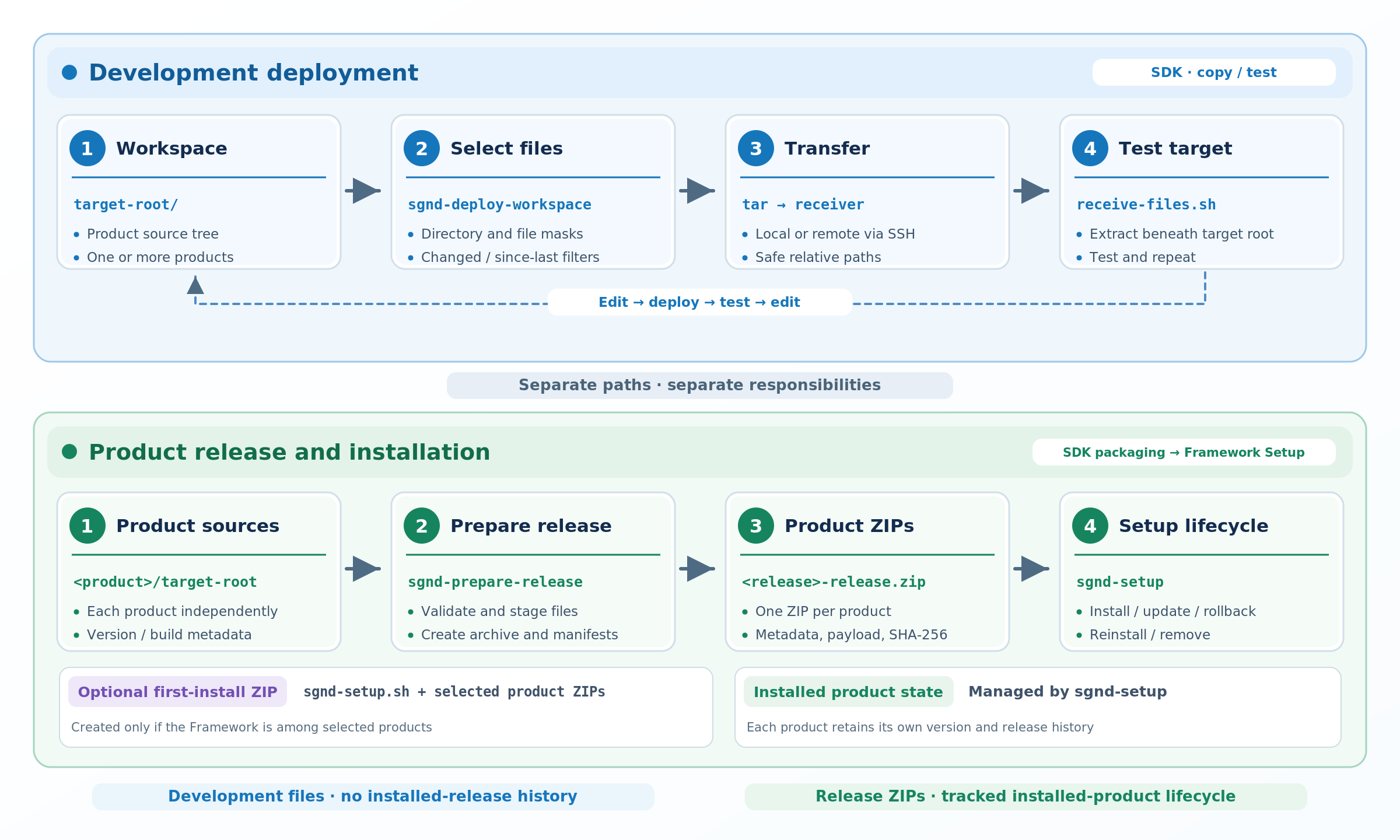
Development deployment—deploy-workspace.shtransfers a workspace or selected workspace content to a target root for testing. It does not create installed-release history. -Release deployment—prepare-release.shcreates product release ZIPs.sgnd-setupvalidates and installs those packages and owns update, rollback, reinstall, and removal.
The distinction matters. Development deployment optimizes the edit/test loop; Setup manages complete, identifiable releases.
Reusable Development Deployment Profiles
sgnd-deploy-workspacesupports named deployment profiles. Each profile remembers the transport, workspace selection, target root and the date of its last successful deployment independently of other destinations. The existing local and SSH receiver workflows remain the transfer mechanism. Profile settings do not alter release-manager state or installed-release history.sgnd-deploy-workspace --manage-profiles sgnd-deploy-workspace --profile Development --dryrun sgnd-deploy-workspace --profile Testadura-HQ --since-last sgnd-deploy-workspace --profile Testadura-HQ --autoExplicit CLI options override profile defaults, so
--source,--target,--remote,--matchand existing selection filters remain usable. Dry-runs and unsuccessful transfers do not advance the profile's success timestamp. Legacy 2.2.2631102 deployment defaults and success date are migrated once; original state is retained. Profiles are versioned JSON stored under~/.config/solidgroundux/deployment-profiles/sdk.jsonby Framework.
Release Preparation
prepare-release.shturns a projecttarget-rootinto a distributable product release. It resolves project identity from project definitions, validates metadata, refreshes Version/Build/checksum information as requested, verifies public wrappers, and creates the archive and integrity material required by Setup.
A product release ZIP contains, at minimum:
release-package.info
<product>-<version.build>.tar.gz
<product>-<version.build>.tar.gz.sha256
<product>-<version.build>.manifest
<product>-<version.build>.manifest.sha256
<product>-<version.build>.removed
<product>-<version.build>.removed.sha256
release-package.infoidentifies the owning product before the payload is extracted. The tar archive is complete rather than incremental; the.removedmanifest records paths that belonged to an older release but must no longer remain installed.
Release preparation and installation are intentionally separate operations. The SDK creates packages; Setup consumes them.
Product Packages and First-Install Bundle
Version 2.1 uses individual product ZIPs as the release unit. Framework, MCM, and SDK packages remain independently identifiable and versioned.
For a clean machine, the generated first-install bundle collects the bootstrap entry point and the product packages needed to establish the suite. Its shape is:
sgnd-setup.sh
SolidGroundUX-<release>-release.zip
SolidGroundUX-Management-Console-Modules-<release>-release.zip
SolidGroundUX-SDK-<release>-release.zip
The bundle is a convenience/bootstrap container, not a fourth installed product.
Setup
sgnd-setup.shis the canonical installation and product-lifecycle interface for current SolidGroundUX releases. It is self-sufficient enough to run before the Framework exists and to remain usable for repair when the installed Framework cannot be bootstrapped normally.
On a healthy installation Setup can reuse the normal SolidGroundUX UI primitives and active theme. When that is not possible, it uses its own small fallback UI rather than making recovery depend on the component being repaired.
After installation the public entry point is:
sgnd-setup
Common non-interactive actions include:
sgnd-setup --check
sgnd-setup --download
sgnd-setup --update
sgnd-setup --install
sgnd-setup --rollback
sgnd-setup --remove
A specific local product ZIP can be supplied as a transient source:
sgnd-setup --install --source /tmp/SolidGroundUX-2.1.<build>-release.zip
Automation can combine an action with
--auto; project selection can be made explicit with--project <slug>.--dryrunpreviews filesystem actions without applying them.
The executable's generated
--helpoutput is the authoritative option reference. This preface describes the lifecycle rather than duplicating every argument.
First Installation
A clean installation begins by extracting the first-install bundle and running:
sudo ./sgnd-setup.sh
Setup can discover the adjacent product ZIPs, validate them, and install the selected products. The bootstrap copy is then replaced by the canonical installed Setup copy used for future lifecycle operations.
After a successful interactive first installation the user can continue into Setup, open the Management Console, or return to the shell. Exiting to the shell is a normal completion path; first installation does not require entering another tool.
Updating and Reconciliation
Updates install a complete incoming release rather than applying binary deltas. The incoming manifest establishes the files that belong to the new release, while the
.removedmanifest identifies obsolete paths that must be removed from the active installation.
This model keeps the target filesystem reconcilable: an update is defined by the desired release contents, not by a chain of imperative patches from every historical version.
Rollback, Reinstall, and Removal
Setup keeps enough release history to reinstall or roll back to archived product releases. Rollback makes the installed filesystem match the selected archived release rather than merely copying older files over newer ones.
Removal is conservative. Managed files and symlinks are removed; directories are removed only when empty. Release packages can remain available for later reinstall.
Product installation state and host configuration are different concerns. Removing or replacing the SolidGroundUX software tree does not imply undoing every system setting that SolidGroundUX previously configured on the host.
New installation and lifecycle documentation should use
sgnd-setup. Maintaining both tools as equal, parallel entry points would make the documentation and operator model needlessly ambiguous.
GitHub Acquisition
Setup can query the configured GitHub release source, compare the published release with local/installed state, and download the product ZIP when acquisition is needed. Acquisition changes where a package comes from; it does not change the package installation model.
Local files, downloaded files, and first-install bundle files therefore converge on the same Setup validation and installation path.
Workspace Deployment
deploy-workspace.shexists for development, staging, and repeatable test deployment. It can transfer a complete workspace or a filtered/incremental selection into a local or remote target root whose layout mirrors the eventual installed filesystem.
Workspace deployment is not a substitute for Setup. It does not admit a release into installed history, does not turn an arbitrary development tree into a release, and should not be used to test lifecycle behavior that depends on product packages.
A useful development sequence is:
edit source
    -> deploy-workspace.sh
    -> exercise/test target
    -> regenerate documentation through MCM when needed
    -> prepare-release.sh
    -> sgnd-setup --install/--update using the produced ZIP
Integrity and Recovery
Release artifacts carry SHA-256 sidecars so Setup can validate the package material before installation. The Setup executable is intentionally capable of operating with its fallback UI when Framework bootstrap is unavailable, which keeps the repair path independent from the health of the active runtime.
The result is a simple ownership model:
deploy-workspace.sh   development copy/test loop
prepare-release.sh    release creation
sgnd-setup            installed product lifecycle